You may be familiar with the idea of linting for code, e.g. via {lintr} in R which “checks for adherence to a given style, identifying syntax errors and possible semantic issues.” It’s super helpful both for ensuring that your code meets your standards, but also when working in a team; no more arguing over nits in PRs about code style — it can be checked against your style guide rules automatically and enforced with tools like {styler}. For Python the popular tool is ruff which handles both the linting and formatting.
What these tools don’t do, though, is lint the prose — the text between the code blocks that explains your process. In order to do that, a tool needs to ignore the code and focus on the writing (because as much as Pythonistas say it “reads like English”, it’s not). An open source tool, vale, handles this task and integrates smoothly with many platforms.
I first heard about vale at Everything Open 2025 (formerly known as Linux Conf). I attended a genuinely enjoyable workshop run by Alec Clews a.k.a. alecthegeek and spent a little bit of time playing around with it, but never really integrated it into my workflow.
It’s used at some big companies including Datadog.
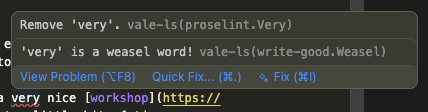
I’m working on some blog posts this week and encountered a situation I’d prefer to catch automatically in the future, and decided it’s time to do this properly and integrate vale. It has LSP support, so if you’re using VSCode it can add squiggles and hover info directly into your text. Here’s how it looks for me:
The instructions to generate the configuration file are okay, but there’s also an interactive generator with some checkboxes. You can adopt one of the common style guides (Microsoft, Google, or Red Hat) and add some extra features in packages such as alex which checks for inconsiderate writing.
There’s a linter for spelling (I do run a spell check, but now it can get caught earlier); one for doubled words (“it was the first of of May” catches the double “of”); and maybe you’d be up the creek without the cliché checker.

I added a lot of checks (since they’re not gating my workflow, just informing it) and it does highlight dozens of potential things to consider. It’s possible to turn these off individually if they get too noisy and I don’t need the check, e.g. with
Google.OxfordComma = NO
in the config.
Some additions not rolled in from the packages that I wanted for my own work include:
Linting .Rmd Files
Since I use .Rmd (R markdown) for my blog posts I wanted vale to process these files. It checks extensions and can do different things for different files. It’s also markdown-aware, so it knows to skip over code blocks when checking prose. That’s limited to .md files, though, so I needed to add to my config
[formats]
Rmd = md
to specifically treat .Rmd as if it was plain .md (which it nearly is) otherwise I get a whole pile of warnings about the parentheses around function arguments (or maybe I should just use Haskell more, which uses whitespace for function application).
Sentence Length
The Readability package does some processing to determine a score based on the writing style, but I wanted to specifically check that my individual sentences weren’t too long — I have a tendency to ramble sometimes. I added that as a custom style
# styles/local/SentenceLength.yml
extends: occurrence
message: "Try to keep sentences short (< 40 words)."
scope: sentence
level: suggestion
max: 40
token: \b(\w+)\b
so now I get a suggestion if I use more than 40 words in a sentence along with the built-in checks for ‘overly wordy’ usage

Pronouns
The Google rules do have something for pronouns, but it looks for uses of unnecessary mixed gender ‘she/he’ preferring ‘they’. I wanted one for identifying uses of just ‘she’ and ‘he’ (and related) in isolation to remind me to either confirm pronouns or use ‘they’. I added
# styles/local/GenderPronouns.yml
extends: existence
message: "Consider whether '%s' should be 'they' or rephrased."
level: warning
ignorecase: true
nonword: false
tokens:
  - \bhe\b
  - \bshe\b
  - \bhim\b
  - \bher\b
  - \bhis\b
  - \bhers\b
and now this gets flagged.
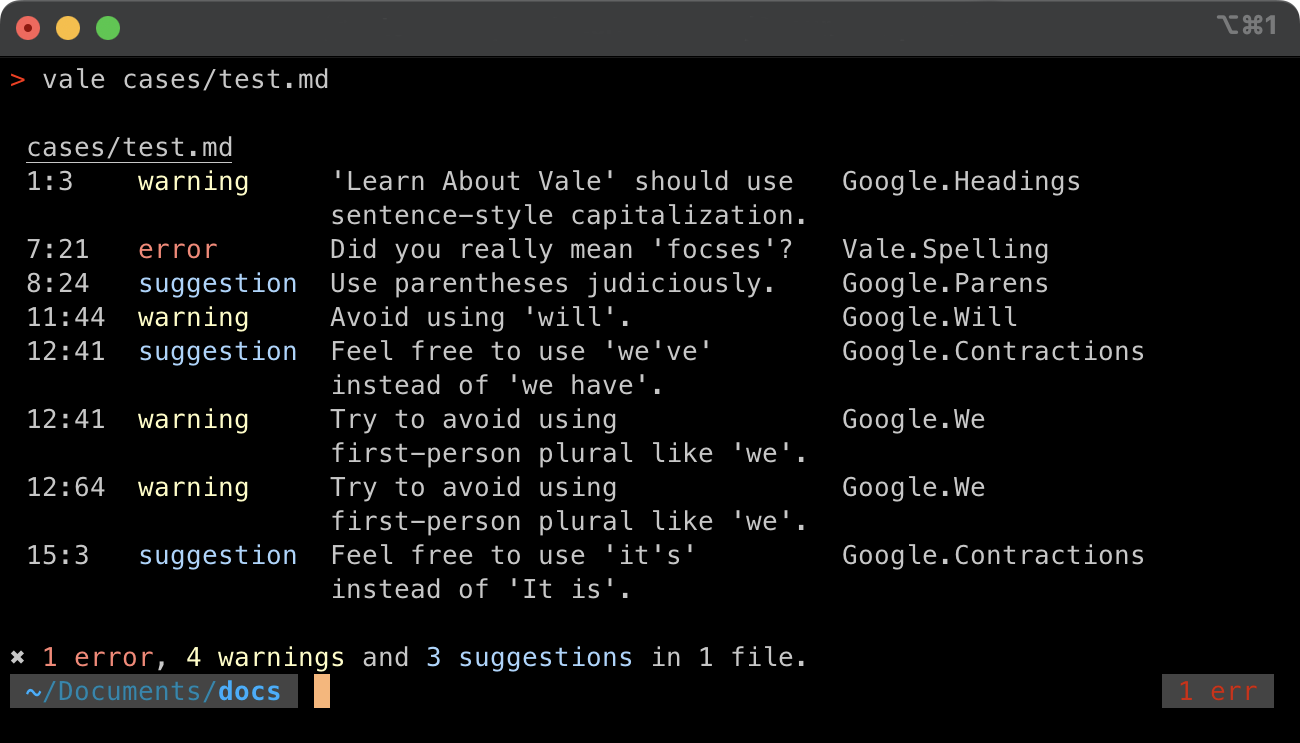
As well as using this within VSCode I can call vale directly from the command line and get the list of issues. It even works with stdin if you tell it what format to assume, reporting the text that is flagged, and which rule it violates
$ echo "I found it cool when he did did that." | vale --ext=.md

 stdin.md
 1:22  warning  Consider whether 'he' should be 'they' or rephrased.  local.GenderPronouns
 1:25  error    'did' is repeated!                                    Vale.Repetition
 1:25  warning  'did' is repeated!                                    write-good.Illusions

✖ 1 error, 2 warnings and 0 suggestions in stdin.
Here’s hoping it helps to improve my writing. I’m already feeling more conscious of my word choices.
The Bigger Picture
The bigger question I’m faced with is about AI and my writing. I’ve never had AI generate my prose for any of my posts (I’ve been deliberately sprinkling in emdashes out of spite ever since I figured out how to type them on my Mac… here’s a few more — — —) and doubt I’ll ever feel comfortable doing so. I do ask an agent to review what I’ve written for grammar, consistency, accuracy (as best as it can tell) and readability, and it’s caught things I’ve overlooked for sure. Tools like vale remind me that there are ways to do some of this that doesn’t need to chew through tokens.
I get annoyed when I see people demonstrating spinning up an agent to call a tool to find out what the weather forecast is today in their city. Maybe it’s just that it’s a ‘simple’ demonstration, but it’s a problem for which there is a human-facing tool ready to be used — you can go to your favourite website and check for yourself.
As the people who build some of the tools, I do worry that we’re avoiding solving some problems just so that we can use AI. I’ve seen projects spinning their wheels trying to get AI to give the ‘right’ answer to a problem that’s deterministic; they know how the data needs to flow from where it is, how to transform it, and what the result should look like, but insist on repeatedly getting an agent to do the work rather than coding up the transformation.
For my own work, I think every time an agent gives me some feedback about a pattern I’m violating, I’ll be looking to include a linting rule for it so that I just don’t make the same mistakes over and over. This isn’t useful for 100% of my writing — I do leverage the Grammarly extension in my browser to catch typos in emails and forms and I’m not going to drop into a markdown document to edit everything I do, but tools like this are fantastic for integrating into a proper, thoughtful workflow.
Do you use vale? Specifically for R users (or, I suppose, any other language + prose users) are there some good rules I should add? You can find me on Mastodon at https://fosstodon.org/@jonocarroll or via my main blog https://jcarroll.com.au.